Free shipping applies to orders over $900 and under 40lbs dimensional weight of the shipping box. Paint and replacement lamps are excluded. Free shipping is available to the contiguous 48 US states and for online purchases only.
ZePrA 12.1 is a major new version of our color server. It addresses several new features our clients have requested. These new features make ZePrA 12.1 a must-have version for existing clients, as well as new clients.
Push-2-ZePrA
Adobe Photoshop extension that allows color conversions for image files from Photoshop
Improved Spot Color Iteration Wizard
Iterate spot colors rendering much easier and faster
Extended Document Color Space
Support for CMY profiles as Document Color Space
New spot color conversion option
Prevent the use of more than one gamut extending color
New SmartLink features and color space support
New SmartLink presets for 1CLR to 3CLR profiles
Extended and improved CIE Conversion
Viewing Condition is applied to all relevant settings in configurations
Preserve White in Images and Vectors
Ensure preservation of 0% ink areas when printing with white ink on transparent or colored substrates
Improved Command Line Interface
New Spot Color Report command for the CLI
New deltaE column
DeltaE display for custom spot color rules in the Spot Colors tab
New productivity features
Converted files can now be accessed directly from the Overview
More convenient export of configurations
Configurations can now be exported from within the Overview
Software Maintenance Agreement
KEEP APPLICATIONS UP-TO-DATE
The SMA is a paid annual plan which provides an upgrade to the latest version of the application at no additional charge to the end user.
MAJOR UPGRADES INCLUDED
Anytime ColorLogic releases a major software version, all users with a current SMA are eligible to receive a new license free of charge.
WHY PURCHASE?
ColorLogic highly encourages the add-on of the Software Maintenance Agreement (SMA) to the purchase of ColorAnt, CoPrA or ZePrA to keep all applications up to date.
ColorLogic ZePrA Toolbox
Start
Auto Setup - Create workflows using one of
six standard auto setup configurations based on the most common color management tasks in print production. Files that can be processed include:
TIFF, JPEG, PSD or PSB image files, as well as
PDF files.
Main Setup and Overview
Overview - Access ZePrA's
Overview Screen. View queues, pending jobs, processed jobs. Configurations can be assigned to
Queues at any time and the order in which queues are processed can be controlled, allowing control over specific queues raising or lowering priority for file processing.
Configurations - creates and manages all the settings related to the handling of
color and PDF specific parameters. The settings in Define Configuration include color conversion using
ICC device profiles or
ICC DeviceLink profiles.
Queues - All the basic functions of queue folder management are available for modification;
input, output, originals, error, temporary folder and the
Define Queues dialog. The Queue customization options include: appending the file name with a
custom job id, assigning a new configuration for the Queue, post processing and
generating reports to a specific folder.
Tools
Spot Color Report - is helpful to check the
spot color conversion before printing. You can either check a specific PDF file with spot colors that needs to be converted or how a spot color library with multiple Pantone or other spot colors would be processed through ZePrA.
SaveInk Report - Generate a
SaveInk report by either right-clicking on jobs under
Processed or by clicking on the icon via the Navigation Panel. The report generates a detailed overview of all the SaveInk queues set up and processed jobs.
Extract ICC Profile - extracts the embedded profile from images and the output intent from PDF/X files. The
extracted ICC profile can then be stored in a predefined location.
Global Settings
Spot Color Libraries - Allows optimized conversion of
spot colors in PDF files into
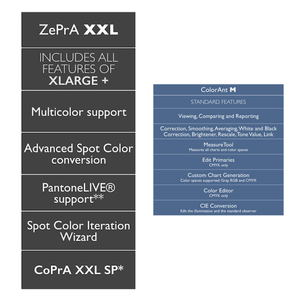
CMYK. If the ZePrA XL package or
Multicolor has been licensed, (which includes the Spot Color module), it has the ability to monitor Multicolor spaces and to convert
spot colors to
Multicolor.
Gradations - The application of gradation curves completes the process of preparing data for printing. Shortly before going to press, almost every printing process calls for a
tone value correction(TVI) that is stored in the RIP of the platesetter.
Profile Assignments - Profile Assignments is an option in conjunction with SmartLink that enables the use of existing, already tested or special DeviceLink profiles that are based on the
ICC standard for converting your data.
Auto Setup Wizard
ZePrA converts all
Images, including vector shading, with the highest accuracy and 16-bit precision.
Color convert PDF and Pixel files with ICC or DeviceLink profiles automatically.
PDF flattening flatten or rasterize PDF files on-the-fly within ZePrA.
CLI module is required for
Switch integration as it includes CLI capabilities.
ZePrA includes single navigation panel to easily access all the functions to set-up and control ZePrA.
Multicolor supports color management for all color spaces including Multicolor.
Advanced Spot Color Conversion include improvements in spot color conversion performance and spot color conversion quality.
ZePrA automatically configures all the necessary
Hot Folders and is instantly ready to process PDF, TIFF, JPEG or PSD files for the CMYK, RGB, Grayscale, Multicolor color spaces and spot colors.
Creating a queue for a PDF/X-compliant workflow will setup the descriptive parameters for the output conditions automatically.
SmartLink-DeviceLink generation on-the-fly
The ColorLogic
SmartLink function permits dynamic generation of DeviceLink profiles, taking various factors into consideration, such as preservation of the separation characteristics, use of the TAC of the target profile, preservation of pure colors with simultaneous dynamic gamut mapping.
SmartLink now integrates
CoPrA SP(serialized profile) with ZePrA.
Many options are available allowing users to define how SmartLink shall create the DeviceLinks, optimized for traditional printing like Offset, Gravure or Newspaper or targeted for Digital Printing or
Large Format Printing.
Users can also have their own preferences regarding color conversion by adjusting SmartLink with their own DeviceLink presets, since CoPrA SP is part of the SmartLink package.
SmartLink enables users to compensate deviations from either their home standard or to the desired printing standard.
XL package offers
SaveInk profiles for user's house standards. Select either one of the three preset saving options (SaveNeutral, Strong Save or SaveMax), or use CoPA SP to make presets and apply them directly in ZePrA.
Reprofiler SP(serialized profile), is a part of the SmartLink package and it’s generated profiles can be easily integrated in ZePrA.The comprehensive XL package will automatically create SaveInk profiles for your own house standards. Select either one of the three preset saving options (SaveNeutral, Strong Save or SaveMax), or use CoPA SP to make your own presets and apply them directly in ZePrA.
Spot Color conversion
Spot color solution is aimed for packaging printers which have to deal with numerous spot colors and need to optimize their printing process by converting spot colors into CMYK or Multicolor process colors.
The ColorLogic solution offers printers the secure knowledge of getting the best possible conversion of spot colors into process colors, both in terms of colorimetry and regarding best printability.
ZePrA uses spectral data and spot color libraries and can optimize colors based on custom conversions.
Push-2-ZePrA
The extended
Push-@-ZePrA
feature is an Adobe Photoshop extension that allows to covert an image file in Photoshop with ZePrA from photoshop.
Convert PSD files using DeviceLinks.
Better color rendering of images than typical color conversion with Photoshop.
Best possible color conversion of images without leaving Photoshop.
Spot Color Report
The new
Spot Color Report
feature is helpful to check the spot color conversion before printing. You can either checka specific PDF file with spot colors that needs to be converted or how a spot color library with multiple Pantone or other spot colors would be processed through ZePrA.
Gradation corrections
Gradation curve corrections ensure compliance with printing standards and is helpful to compensate variables in the printing process.
The printing characteristics can be directly included in the data. You may apply curves on process and spot colors.
Gradations allows last minute changes to data, too.
Integration with Enfocus Switch
Integration with
Enfocus Switch is made to realize a complete workflow - from data receipt, to data checking and color conversion, all the way to data distribution.
macOS: ColorAnt, Measure Tool, CoPrA and ZePrA are running in 64-Bit mode
Windows: ColorAnt, Measure Tool, CoPrA and ZePrA are running in 64-Bit mode
ColorLogic has developed an extensive portfolio and a line of first class color management technologies since being founded in 2002. Our team is continually encouraged to improve product quality and create new technology to solve day to day color management challenges in order to meet the high demands of the industry. We achieve this by working closely with our trusted partners to serve our common clients in the most effective way possible while addressing the continuously changing market requirement with innovative solutions.
Free Shipping
Free shipping applies to orders over $900 and under 40lbs dimensional weight of the shipping box. Paint and replacement lamps are excluded. Free shipping is available to the contiguous 48 US states and for online purchases only.
Fulfillment
We make every effort to get your product delivered as expediently as possible. Orders placed after 12:00 PM MST may not ship that day. RPimaging, INC may not have all items in stock. Our online store does not provide real-time stock availability. Please call to confirm stock before placing an order. Orders placed by international checkout button are fulfilled by FedEX Cross Border.
Domestic Shipping
RPimaging, INC does not guarantee any delivery time. Shipping terms (i.e. 2nd Day, 3rd Day delivery) refer to the time quoted by the shipper for delivery. These shipping terms do not refer to time from order submission to delivery. Shipper tracking numbers are provided, when available, the day after the product has shipped. Economy and Free shipping options are limited to the 48 contiguous US states. Freight shipment and packages over 40lbs are excluded from Economy and Free shipping offers. Customer purchase orders with payment terms are excluded from free shipping offers. We reserve the right to rescind Economy and/or Free shipping offers for any reason. Orders are shipped Free On Board (FOB) Origin unless otherwise noted.
International Shipping
Orders placed using the international checkout button are fulfilled by FedEX Cross Border.
All international packages are subject to relevant duties and taxes.
A refusal of the shipment will result in return shipping charges which will be deducted from any refund.
Typical delivery time is 2 - 5 days in transit depending on destination country.
Next Day delivery service is not available.
Date specific shipping is not available for international orders.
If you have any questions or need assistance, pleasecontact us.
RETURN POLICY:
If you are not happy, we are not happy.
We strive to ensure you are satisfied with your purchase but understand that sometimes it's not a good fit. Below are our policies:
No return will be accepted without a RMA (Return Material Authorization) number. Any return without a RMA number will be refused.
You are responsible for return shipping costs.
No refund or exchanges are allowed after 30 days from the invoice date.
Returns are subject up to a 20% restocking fee. Most of the time restocking fees are nominal.
All returned items must be 100% complete, in original resalable packaging, in resalable condition, with all packaging, manuals, registration cards, accessories, UPC codes intact, and software.
Software products that use a serial number and not a dongle key can only be replaced with the same title and version if found to be defective.
No returns on replacement light bulbs.
No returns on special order items not listed on our online catalog.
No returns or exchanges for any non-domestic shipments.
Shipping charges and order processing fees are not refundable. We recommend you select a shipping carrier that provides a shipment tracking option and insurance. Refusal of a shipment will result in return shipping charges which will be deducted from any refund.
RPimaging, INC reserves the right to refuse any return.
RPimaging, INC shall not be liable for any consequential or incidental damages arising from purchases from our online store.
Got Any Questions?
Contact Form
Fill in this form to have one our color experts reach out. We'll get back to you as soon as possible.
Live Chat
You can also utilize our Live Chat to contact us.
Phone
Alternatively, you can reach us toll free at
(866) RGB-CMYK—(866) 742-2695 or our local phone at
(520) 323-5855.
We are available 9:00AM - 5:00PM MST Monday - Friday.