



Search our catalog

We also offer custom consulting and training services for commercial, digital, flexo, web, and grand format printing markets.

Lighting

Monitors

Spectrophotometers

Densitometers

Color Communication

All the hardware you need to ensure the quality of your color

All the software you need to ensure the quality of your color

Upgrade

C-3004

ColorLogic CoPrA L Upgrades

  • ColorLogic CoPrA 11

    CoPrA

    CoPrA is the control center for any ICC color profiling task. CoPrA creates high quality printer, DeviceLink and SaveInk profiles with a user friendly interface for any color space and printing process. Offering some of the most intelligent and advanced profiling tools in the industry today, CoPrA can be even used for industrial printing processes such as textiles, ceramics, flexo and others.


    Save time and money with its wide range of features to optimize print pro- duction. A must-have tool for any color management professional to capture the characteristics of their presses and printers or to implement high quality extended gamut printing.


    What's New in CoPrA 11?

    • DeviceLink Linearization:  More Linearization Options and new channel-specific Custom ink limitation
    • Profile Manager:  Redesigned Profile Filter and improved Profile List
    • Profile Manager: Major improvements to the Gamut tab
    • Black Ink Simulation:  Improved new soft proof option and new InkSave information
    • DeviceLink Profiling:  New 3D conversion Gamut view in DeviceLink Profiling
    • Image Conversion: New Toggle Preview for color management workflow comparison
    • Image Conversion: New image preview scaling options
    • Batch Overview:  The optimized Batch Overview simplifies the further processing of profiling jobs

    Software Maintenance Agreement


    KEEP APPLICATIONS UP-TO-DATE


    The SMA is a paid annual plan which provides an upgrade to the latest version of the application at no additional charge to the end user.


    MAJOR UPGRADES INCLUDED


    Anytime ColorLogic releases a major software version, all users with a current SMA are eligible to receive a new license free of charge.


    WHY PURCHASE?


    ColorLogic highly encourages the add-on of the Software Maintenance Agreement (SMA) to the purchase of ColorAnt, CoPrA or ZePrA to keep all applications up to date.


    ColorLogic CoPrA Features

    Features CoPrA Basic CoPrA M CoPrA L CoPrA XL CoPrA XXL
    RGB, Gray, CMYK Profiling
    Profile Manager
    Printer Profile Updating
    Create profiles with presets only  
    Presets and manual profile controls  
    ColorAnt M Optimimize measurement data    
    ColorAnt L Optimize and edit multicolor measurement data        
    DeviceLink Linearization    
    DeviceLink creation, editing and updating    
    Edit DeviceLink Recalculating    
    SaveInk Profiles Create SaveInk DeviceLinks      
    Edit DeviceLink up to 9 channels        
    Multicolor Profiles up to 15 channels        

    Printer Profiling

    printer profile
    copra update profile

    New Printer Profile - Depending on the package and modules purchased, CoPrA will profile the following color spaces: Gray, RGB, CMY, CMYK or Multicolor. The profiling Settings can be saved and re-used or edited. This ensures consistent profiling and increased color quality in production.


    update profile

    Update Profile - an innovative approach to updating ICC profiles without printing a large test chart and defining profile settings from scratch. This approach requires printing a small control strip to quickly update a profile for changing print conditions.


    Device Link Profiling

    device link

    Device Link- With CoPrA 11, the flexibility in creating a DeviceLink Linearization has been greatly improved. Adding a dedicated Ink Limitation mode with the option to set Custom ink limits allows for user-defined, channel-specific ink limiting. The previous options with fixed ink limits have now been replaced by a more flexible alternative.


    editing
    White-Black_Editing - RPimaging, INC - White-Black_Editing

    Editing - Improved patch selection and analysis. When moving the mouse pointer over a color patch, it is highlighted by a black or white frame and the source and target color space values are displayed. A left mouse click captures the color patch, making it easier to check whether and to what extent it is affected by an exception.


    save ink
    copra recalculation

    SaveInk

    reduce the amount of cyan, magenta and yellow used - without any loss of quality and control the amount of TAC (total area coverage) reduction by optimizing the black composition of the data. Applying this function to a moderate degree enhances the stability of the printing process, while use of a stronger level saves even more ink.

    SaveInk for Multicolor - users with a Multicolor license benefit from the extension of the SaveInk module to create SaveInk DeviceLink profiles based on Multicolor profiles. Note: for Multicolor profiles to use SaveInk profiles, a black channel must be present and it must be the fourth channel; profiles that do not follow those rules cannot be selected.


    recalculate

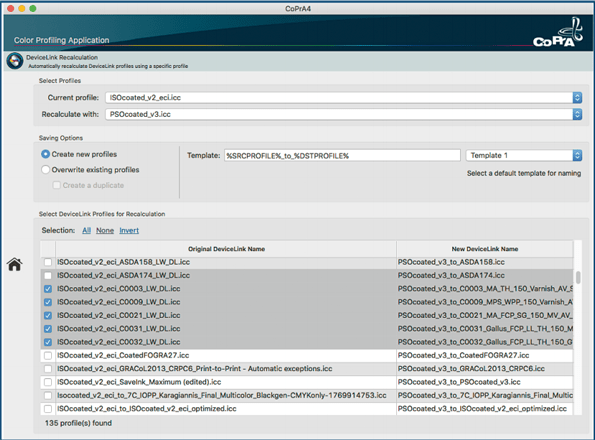
    Recalculate - Recalculate DeviceLink profiles with a different profile. It is a great time saver if there are several DeviceLink profiles that require updating. This function is especially useful when an optimized printer profile based on a reference profile has been created using the Printer Profiling tool Update Profile, and all existing DeviceLinks based on that reference profile have to be adapted to the new optimized profile.


    Toolbox

    image conversion

    Image Conversion - Convert images using a variety of profiles. It converts PSD, TIFF and JPEG files with ICC device profiles and DeviceLink profiles. Typical application programs do not support all types of DeviceLink (i.e. RGB to CMYK) or multicolor profiles.


    profile manager
    ProfileManager_SetComparison - RPimaging, INC - ProfileManager_SetComparison

    Profile Manager - Redesigned Profile Filter and improved Profile List. The Profile Filter section has been redesigned to be more compact, leaving more space for the Profile List.

    New column sort function and new Date column in the Profile List.  All columns can now be sorted by clicking on the column title. A new addition to the Profile List is the Date column, which displays the creation date of the respective profile.


    batch overview
    copra batch overview

    Batch Overview - create several profiles at once and perform additional functions once profiles have been generated. While the profile is being calculated, load new measurement data, prepare the next profile(s) or create variations.The toolbar also includes the option to create PDF or XML reports.

Customer Reviews

Be the first to write a review
0%
(0)
0%
(0)
0%
(0)
0%
(0)
0%
(0)
31
Verified Reviews
🎁 BLACKFRIDAY has been copied to your clipboard!
: : :
:
:
:
Coupon here!