




Search our catalog

We also offer custom consulting and training services for commercial, digital, flexo, web, and grand format printing markets.

Lighting

Monitors

Spectrophotometers

Densitometers

Color Communication

All the hardware you need to ensure the quality of your color

All the software you need to ensure the quality of your color

Sale

CG3200X-BK

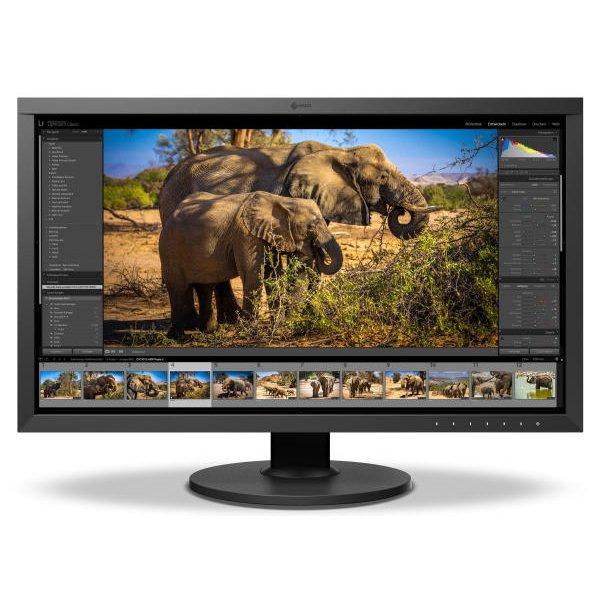
EIZO ColorEdge CG3200X 4K 31.5in Color Management OLED Monitor

8 items left

Free Shipping Icon FREE Ground Shipping on orders over $900 within the United States
  • EIZO ColorEdge CG3200X-4K 31.5in Color Management OLED Monitor


    Features


     EIZO's Proprietary ABL Control System


    Maintain Creative Intent

    ABL can affect accurate highlight evaluation if a bright scene causes unexpected dimming. ABL Safe View helps prevent this by reducing the display area to 10% or 25%, lowering the average brightness and reducing the likelihood of ABL activation. This allows creators to preview content at its intended brightness without automatic dimming.


    Luminance Warning

    The Luminance Warning function uses color indicators to identify areas that clip at a defined brightness level. In Highlight Dimming mode, it also highlights regions affected by ABL, making both easy to identify. The indicator color can be set to yellow or magenta.


    Higher Luminance Thresholds

    Conventional OLED monitors rely on ABL (Automatic Brightness Limiter) to protect the panel during bright scenes. As more of the screen becomes luminous, ABL automatically reduces overall brightness, often causing visible shifts that can alter tonal balance and color perception. The CG3200X is engineered with higher luminance thresholds to reduce unnecessary dimming, preserving brightness across more of the image compared to conventional ABL, where bright scenes can trigger aggressive dimming.


    Instant Feedback with Status Indicator

    A blue status indicator lights up whenever ABL control is active, giving creators clear insight into the monitor’s operating state without disrupting the workflow.


    Flexible Dimming Modes

    Even when ABL engages, editors can optimize luminance handling with a choice of two dimming modes, allowing flexibility to suit different project requirements.

    Highlight Dimming
    Reduces brightness only in the most luminous areas, preserving detail and tonal integrity in mid- and low-luminance regions.

    Uniform Dimming
    Adjusts brightness evenly across the entire screen, stabilizing the balance between highlights and shadows while maintainig overall tonal integrity for consistent image evaluation.


    Simple and Precise Color Management


    Built-In Sensor to Automate Your Workflow

    The monitor features EIZO's built-in calibration sensor to maintain color accuracy. This eliminates the need for a third-party calibration device and streamlines color management so editors can stay focused on the creative process. The sensor design has been enhanced, delivering quieter operation for a more focused working environment.


    Color Management Software

    A monitor needs to be calibrated at regular intervals to maintain color accuracy. EIZO's proprietary color management software provides an intuitive and highly precise solution to color management. It allows you to schedule automatic recalibration, calibrate all color modes simultaneously, and conduct correlation with high-end spectrophotometers to match the studio's internal color management framework.


    Color Navigator API

    Additionally, EIZO's ColorNavigator API is available for software developers and system managers to integrate ColorNavigator 7 or ColorNavigator Network functions into third-party applications, such as those used for video editing, color grading, proofing systems, digital graphics, and even remote control. This allows developers to use the API to improve operations throughout the workflow.

    Back to the top ↑

    Editing and Mastering


    True HDR

    The CG3200X features a QD-OLED panel that delivers 1000 cd/m² peak luminance and 300 cd/m² full-screen white, combined with an exceptional 1,500,000:1 contrast ratio. This enables precise reproduction from intense highlights to deep blacks, providing the rich expressive range for HDR content.

    The monitor supports the hybrid log-gamma (HLG) transfer function for broadcasting and the perceptual quantization (PQ) curve for the production of films and streamed content.


    Custom Contrast

    Since SDR content is typically created for display devices with contrast ratios in the range of 1000:1 to 2000:1, it can appear differently on OLED monitors with significantly higher contrast capabilities. The CG3200X allows users to set a custom contrast ratio from 500:1 to 2000:1 in 100-step increments, enabling a more accurate and controlled working representation of SDR content and supporting consistent results across viewing environments.


    Clear Viewing

    The AGLR (Anti-Glare, Low-Reflection) screen reduces glare and ambient reflections, ensuring clear and comfortable viewing.


    Color Fringe Reduction

    With conventional OLED monitors, high-contrast edges in text and fine details can exhibit color fringing. The CG3200X has a dedicated circuit that reduces these artifacts, producing cleaner edges.


    Faithful Motion for Cinematic Content

    The monitor supports 24 Hz and 48 Hz for native display of cinematic content produced at 24 fps. This ensures accurate motion reproduction and artifact-free playback, supporting precise creative decisions in motion, pacing, and shot continuity. As a result, motion can be evaluated exactly as it will appear in final theatrical or streaming delivery.


    Color You Can Trust


    Wide Color Gamut

    The monitor's wide color gamut covers 99% of the DCI-P3 standard used in digital cinema and supports the BT.2020 standard used in broadcasting for exceptionally faithful reproduction of color. It also covers 94% of the Adobe RGB color space so images and video shot in Adobe RGB will be displayed correctly. Color mode presets can easily be changed via the switches on the front of the monitor, enabling straightforward color management for each project.


    Pixel Inspection

    Working within the wrong parameters affects editing decisions, potentially requiring significant rework of projects and causing costly delays in production schedules. Pixel Inspection, operated through the monitor's OSD, shows the color information of a pixel from the source input data and the data as it is displayed on the monitor.

    System managers can use this information to verify that the creator's technical settings match the current project's predefined color parameters, reducing the likelihood of project rework due to mismatched technical settings.


    10-Bit Simultaneous Display

    The CG3200X delivers 10-bit simultaneous display* from a 24-bit look-up table (LUT), enabling the reproduction of over one billion colors simultaneously. This provides 64 times more color detail than an 8-bit display, resulting in smoother gradations and reduced Delta-E between adjacent colors.


    Uniformity Across The Screen

    OLED panels naturally deliver outstanding uniformity. To ensure even greater consistency, EIZO's patented Digital Uniformity Equalizer (DUE)* technology compensates for variations in brightness and color across the panel. By applying correction across the screen at every grayscale level, it helps maintain uniform color and brightness for consistent image reproduction.


    Back to the top ↑

    Signal Processing

    Sync Signal

    The monitor’s Sync Signal function automatically switches color settings, including brightness, gamma (EOTF), and color gamut, according to the metadata of the input signal. This eliminates the need for manual adjustments when working across multiple projects, ensuring users are always working with the correct settings. For added flexibility, users can assign specific color modes to different signal types, enabling customized automatic switching to preset color modes.


    Nearest Neighbor Interpolation

    The monitor supports the Nearest Neighbor image scaling method, which enlarges images by directly copying and replicating the original pixels closest to each target pixel position. Because this method avoids color blending, it preserves the original pixel values, ensuring accurate color reproduction. When Nearest Neighbor is turned off, interpolation is performed using surrounding pixels, resulting in smoother gradations. Editors can easily select the method best suited to their project via the monitor’s OSD menu.


    Back to the top ↑

    Designed for Comfort and Productivity

    Display Ports

    The monitor is also equipped with DisplayPortTM and HDMI inputs. 2 USB Type-A ports are available for connecting peripherals.


    Single Cable Connection with USB Type-C®

    With USB Type-C, a single cable transmits video signal, USB data, and up to 60 W of power delivery so you can connect, charge, and create without juggling cords or adapters. This is especially helpful for creators who move between setups or work on laptops in mobile or hybrid environments.


    Immersive Frameless Design and Shading Hood

    The new 2-sided frameless design minimizes borders so your content stays in focus, while the slim upper bezel discreetly houses the built-in calibration sensor. The included magnetic shading hood reduces glare, attaching and detaching easily without complicated assembly. Together, they create a clean, focused workspace that supports accurate and comfortable viewing.


    Audio Jack

    An easy-access headphone jack lets you connect headphones directly for convenient audio monitoring during content creation. 

    Back to the top ↑

    OLED Protection


    Maintain Panel Performance and Longevity

    The monitor incorporates multiple built-in functions to help reduce the risk of image retention and maintain stable panel performance over time.


    A screen saver automatically lowers brightness when the image remains unchanged, reducing stress on static pixels. Pixel Shift (wobbling) subtly moves the image position to prevent prolonged use of the same pixels, while Pixel Cleaning (Off Sensing) compensates for panel degradation to sustain image uniformity over time.


    To further protect the panel, Thermal Modulation reduces brightness when internal temperatures rise, preventing extended high-temperature operation. Together, these technologies work seamlessly in the background to preserve image quality and extend the lifespan of the OLED panel.

    Back to the top ↑

    Commitment to Quality

    5 years

    5-Year Warranty

    In addition to the high demands placed on production and materials, EIZO also places the emphasis on quality assurance in all areas.

    pixel

    Color and brightness warranty

    The monitor has a color and brightness warranty from the purchase date for a maximum of 10,000 hours of operation at a maximum brightness of 120cd/sq m and a color temperature of between 5,000 and 6,500 K.

    Certified for Quality and Performance

    The monitor is recognized by Fogra as a Class A FograCert Softproof Monitor. Using it in a FograCert Softproofing System ensures designers, print specifiers, and print producers can rely on the soft proof for predictable and consistent results.

    Zero Watts When Turned Off

    When the monitor is turned off via the power button on its front bezel it consumes no electricity.

    Back to the top ↑

    Our Contribution to SDGs

    SDGS

    Our Contribution to SDGs

    As part of its corporate social responsibility (CSR) activities, EIZO is contributing towards the United Nations’ Sustainable Development Goals (SDGs).

    environmentally friendly

    Environmentally Friendly

    This contribution extends to our ColorEdge Monitors; environmentally friendly monitors made with ever improving energy efficiency, using recycled plastics and sustainably procured materials, boxed in recyclable packaging, and with a responsible after-service recycling system.

    Back to the top ↑
    work efficiency

    Higher Work Efficiency

    Furthermore, with innovative technology and software, we aim to improve the working conditions and work efficiency of users. Through these features and more, ColorEdge monitors are upholding the values of the UN’s Sustainable Development Goals, toward a brighter and more sustainable tomorrow.

    Back to the top ↑

Customer Reviews

Be the first to write a review
0%
(0)
0%
(0)
0%
(0)
0%
(0)
0%
(0)
32
Verified Reviews