Curve+ is a G7 Calibration & Gray Balancing stand-alone software toolset comprising of three tools: VERIFY, CALIBRATE, and BLEND. With Curve+, you can calibrate your printing system, verify its accuracy, and prepare your measurements for ICC profiling or for use as color references.
Curve+ Tools:
VERIFY

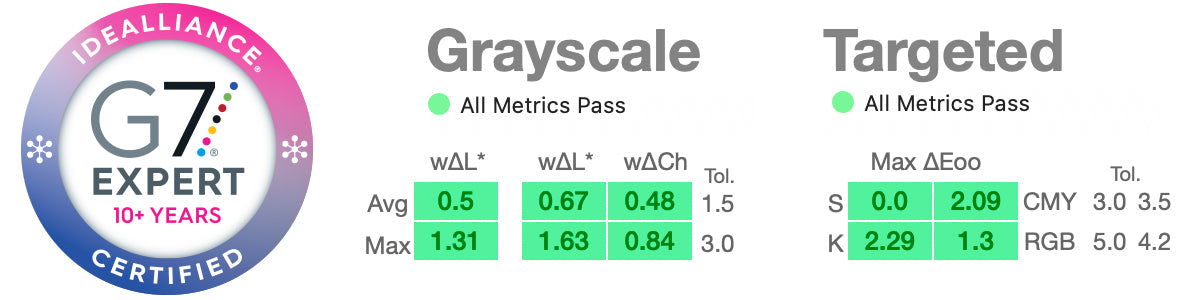
Curve+ new VERIFY Tool calculates G7 conformance according to the most up-to-date Idealliance specifications and returns the results in a clear visual format.
Whether you're looking for G7 Grayscale, G7 Targeted, or G7 ColorSpace compliance, or simply wanting to verify a Color Proof, the VERIFY Tool summarizes your results with a clear pass/fail badge.
Each color patch used is graphically displayed in comparison to the reference color. Any patches missing from your target will clearly show up in the display.
And if you want SCCA-based (Substrate-Corrected Colorimetric Aims) calculations, VERIFY can easily handle it, along with subtle G7 differences such as Custom Gray balance.
In short, the VERIFY Tool gives you confidence in your G7 conformance while remaining easy and flexible to use.
Back To The Top ⇑
CALIBRATE

The Curve+ CALIBRATE Tool is available with the Calibrate or Complete license levels.
Some of the features for CALIBRATE include:
Updated Interface
You'll have easy access to prior calibration sessions including subsetting into presses, customers, etc.
Ink Channel Limiting / Balanced Neutral Black
Up to now, Curve has never altered the 100% level of any ink channels. For offset printing, this is the recommended method. But wth inkjet printing, where the gamut tends to be larger and the mass tone effect can cause significant hue shifts as ink density increases, limiting ink channels can be useful. Gray balance works better when the 300% CMY patch is close to neutral. Curve+ helps bring that CMY combination under control, improving gray balance and tonality in the process.
Calibration From a Smaller Initial Target
For some printing systems a target smaller than the venerable P2P is sufficient for G7 calibration. Curve+ supports "miniP2P" and "microP2P" targets with as few as 96 patches.
Recalibration From a Very Small Target
(only available with Complete license)
When re-calibrating a printing system that has already been successfully G7 calibrated, it's sometimes possible to use a very small target indeed. Curve4 will support Fast Re-Calibration using these targets (when it's appropriate for the printing system and pre-calibrated state).
Recalibration from a non-P2P target (P2P-less mode)
(only available with Complete license)
If you've only run an IT8, ECI2002 or other non-P2P target, Curve+ can generate the information it needs from the supplied patches. It may not have the same level of accuracy as that provided by a P2P target but for many printing systems it'll work just fine.
SCTV (Spot Color Tone Value) support
The Idealliance Print Properties group has determined that the Spot Color Tone Value method is the best for calibration of spot color inks. Curve+ fully supports this method.
Back To The Top ⇑
BLEND

The BLEND tool is available with the Complete license level. It is a group of functions to combine, massage, and process color measurements so you can build the best ICC profiles possible (among other things).
Some of the features for BLEND include:
White Point Adaptation
Alter the white point of your measurements using SCCA-like (Substrate-Corrected Colorimetric Aims) calculations.
Smoothing & Smart Averaging
A multi-dimensional smoothing function that is a very effective method of improving measurements by minimizing measurement noise and other sources of error that only serve to lower ICC profile quality. BLEND will also allow several methods of averaging multiple measurements together.
Apply Curves
Curves created in the CALIBRATE Tool can be applied to measurement sets for Virtual Press Run (VPR) simulation. This function is also available in the CALIBRATE Tool itself.
Back To The Top ⇑